August 4, 2026
Read More
Everything Your
Team Needs
to Stay Productive
Manage projects, assign tasks, schedule meetings,
track approvals,
and collaborate seamlessly from a unified task management system.
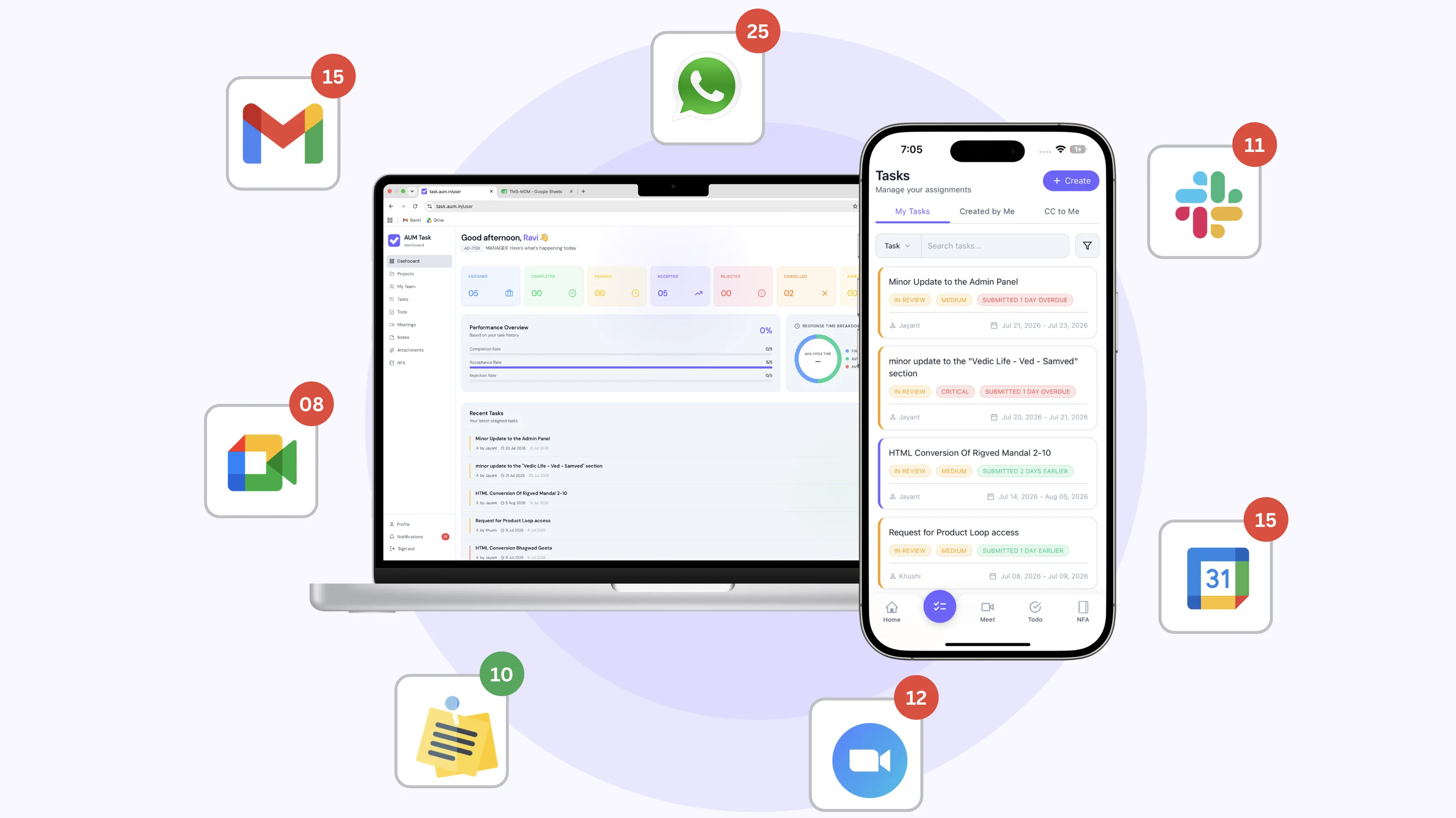
How does AUM Task work?
Our unified task management system explained

QUICK START
Get Started in 4 Simple Steps

Invite Your Team
Add your team members to your unified task management workspace.

Organize Projects
Create project hubs, assign owners, and track deadlines seamlessly.

Track Progress
Monitor tasks with live workflows and real-time team updates.
TASK MANAGEMENT
Manage Tasks with
Complete Visibility
Create, assign, and track tasks across teams with a centralized task management system. Keep projects organized, improve team accountability, and ensure every task moves forward with clear ownership, collaboration, and real time tracking.
AI Descriptions
Auto improve task clarity
Project Grouping
Keep tasks organized
Activity Logs
Track updates in real time
Built In Discussions
Collaborate directly
Priority Tracking
Monitor progress and deadlines
Follow Ups and CC
Keep members informed
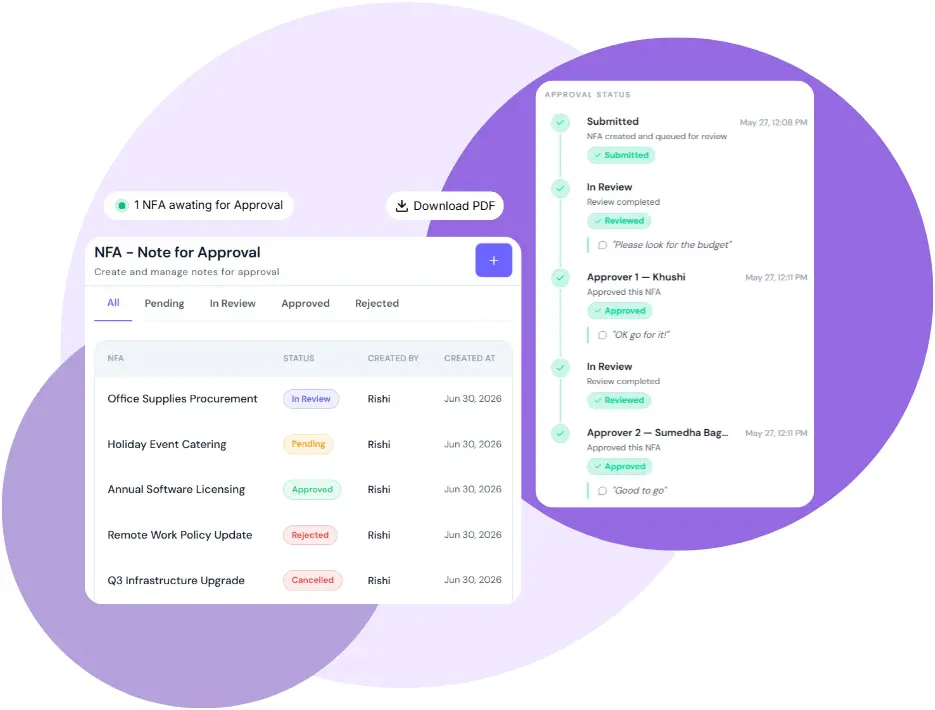
NOTE FOR APPROVAL
Approve work instantly
with strict audit trails
Streamline your sign-off process by generating dedicated Notes for Approval (NFA) for your task management system.
Instant Approvals
Assign specific members to accept, reject, or review
requests.
Lifecycle Control
Track statuses with smart filters or cancel your own
NFAs if needs change.
Absolute Compliance
Download the final, completed approval records for your
audit trails.
TEAM VISIBILITY
Complete clarity over
your team’s workload
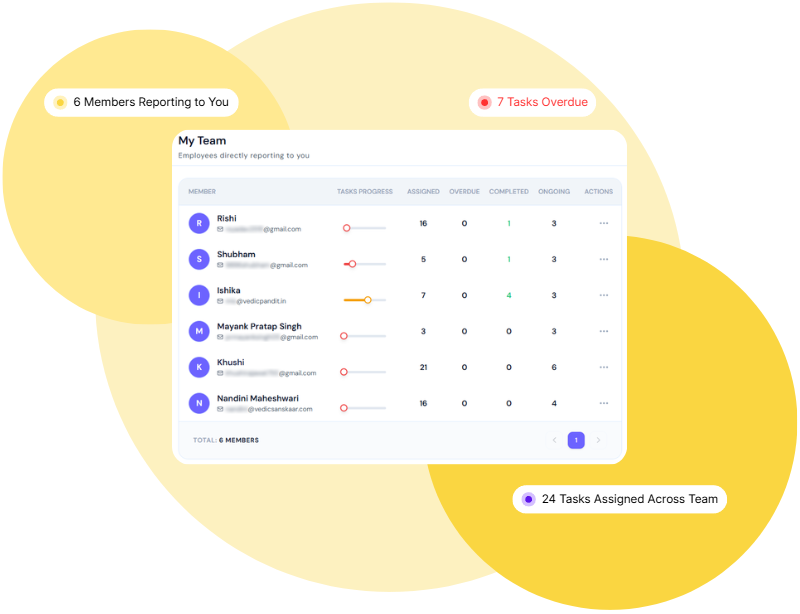
Gain a dedicated team task management workspace to oversee your direct reports and get actionable insights into everyone's current capacity.
Visual Task Tracking
Easily monitor ongoing assignments and individual
progress. requests.
Spot Bottlenecks
Immediately identify overdue tasks and blockers
highlighted in red.
Workload Balancing
Distribute work effectively and ensure your team stays
completely on track.
PERSONAL PRODUCTIVITY
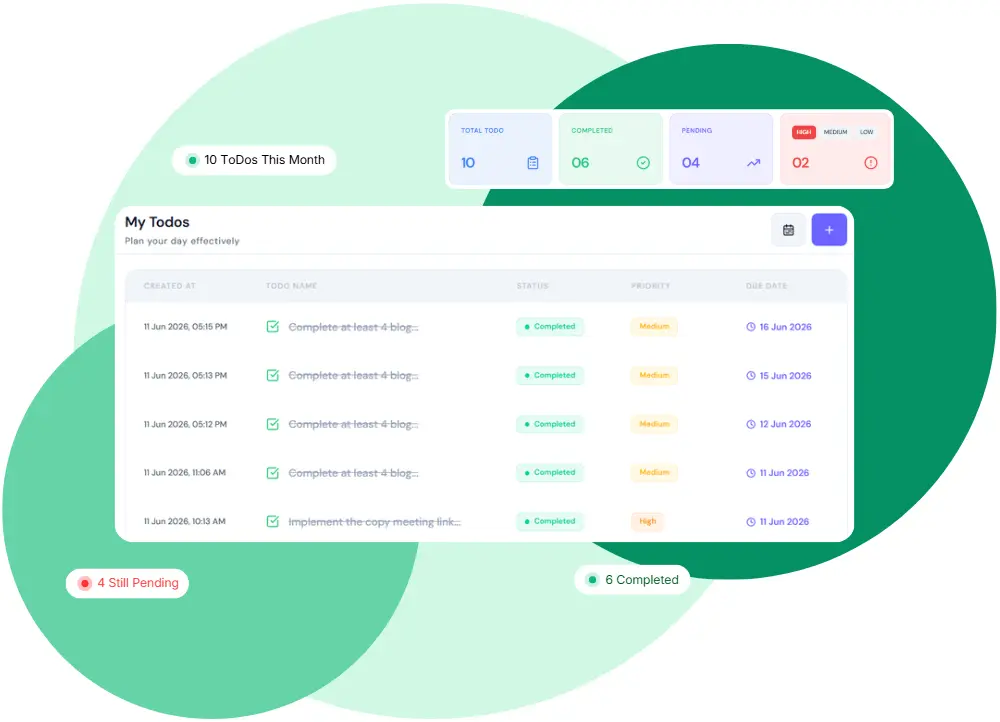
Plan your day effectively
with smart to-dos
Take complete control of your daily workload with a dedicated, clutter-free online task management dashboard designed for focus.
Instant Overview
Instantly view your total, completed, and pending
tasks.
Smart Prioritization
Organize and tackle your schedule using high, medium,
and low urgency tags.
Intuitive Filtering
Filter tasks by date and status in your task management
app to hit every deadline.
PROJECT WORKSPACES
Centralize your team's project management
Centralized Hubs & Metrics: Bring all project-specific tasks and team members into one organized project management system to instantly track progress and spot overdue deadlines.
Strict Privacy: Manage project management system roles and ensure users only see the work they are assigned or CC'd on.
INTEGRATED MEETINGS
Meetings that Actually Deliver
Centralized Dashboard: Keep every sync productive by managing meetings inside your project management tools, without ever switching tabs.
Easy Scheduling & Invites: Quickly schedule new sessions by setting a date and duration, and seamlessly invite internal or external guests using their email.
SMART NOTES
Capture and style your ideas
Rich-Text Capture: Instantly capture your thoughts and working ideas using powerful formatting tools to add headings, insert code blocks, and build tables.
Color-Coded Organization: Visually organize your workspace with customizable color-coded notes to highlight essential information.
Workflow Evolution
Is your task management still manual chaos?
See how AUM Task transforms your daily workflow from scattered stress to organized success.
Without AUM Task
With AUM Task
Scattered Tools:
Wasting time jumping between WhatsApp, disconnected task
management apps, and personal notes just to find updates.
Unified Workspace:
Bring tasks, communication, and file attachments into a single,
organized task management system.
No Central Tracking:
Manual and chat-based requests leave no official record,
destroying team accountability.
Ironclad Accountability:
Replace manual requests with clear owners, precise deadlines,
and automated status updates.
The Visibility Gap:
Managers are left completely in the dark on which tasks are
active, pending, or overdue.
Instant Visibility:
Get a crystal-clear dashboard to track all team actions and
bottlenecks in real time.
Buried Follow-Ups:
Critical updates and decisions get trapped on individual
scratchpads and are easily lost.
Centralized Knowledge Base:
Ensure all documents, follow-ups, and decision histories are
securely logged and searchable.
Approval Bottlenecks:
Sign-offs get stuck in fragmented email threads, stalling
project momentum and delaying work.
Streamlined Approvals:
Use integrated Notes for Approval (NFA) for instant sign-offs
and strict, downloadable audit trails.
Fragmented Software:
Paying for separate tools for tasks, projects, and approvals
that don't talk to each other.
All-in-One Project Management Software:
Get tasks, projects, approvals, and meetings in a single project
management software, no more stitching tools together.
COMPARE
How AUM TASK stacks up
See how AUM Task delivers more value than other project management tools, at a fraction of the cost of other tools.
| Features |

AUM Task
|
Jira
|
monday.com
|
Others
|
|---|---|---|---|---|
|
Pricing
Get affordable task management software tailored to your
budget with zero hidden fees. Only pay for what you
actually use.
|
₹100 / user / month | ₹650+ / user / month (est.) | ₹800+ / user / month (est.) | ₹700+ / user / month (est.) |
|
Free forever for 5 members*
Start small with zero risk. Your first 5 members get
free access with restrictions only on tasks, meetings,
and NFAs—all other core features are unlimited.
|
||||
|
Task Management
Create, assign, track, and prioritize tasks across teams
with columns, categories, and progress indicators.
|
||||
|
Todo's
Manage personal daily checklists in your task management
app without cluttering shared projects.
|
||||
|
Notes
Write, collaborate, and store quick ideas, meeting
minutes, and workspace documentation in one centralized
place.
|
||||
|
Project Management
Organize work into separate boards and projects with
distinct timelines, milestones, and workflows.
|
||||
|
Sub Task
Break down large, complex tasks into smaller, manageable
sub-steps with individual assignees.
|
||||
|
Recurring Task
Automate repeating work by scheduling tasks to re-create
themselves daily, weekly, or monthly.
|
||||
|
Comment On Task
Discuss work directly inside tasks with rich text,
attachments, and user mentions to keep context in one
place.
|
||||
|
Meetings + Google Meets
Schedule video conferences, generate Google Meet links
automatically, and take meeting minutes side-by-side.
|
||||
|
NFA (Note For Approval)
Submit documents for formal sign-off, track approval
chains, and speed up critical business decisions.
|
TESTIMONIALS
Loved by teams standardizing
Loved by teams standardizing
their daily workflows.
Hear directly from teams who replaced scattered chats, endless follow-ups, and lost spreadsheets with AUM Task.
PRICING
Simple pricing,



Simple pricing,
serious value.
Start with free task management for your whole team. Pay only when you grow beyond 5 members.
Free Forever*
Zero charges for your first 5 users. Get started with free
project management software access to tasks, meetings, and
NFA.
₹100 / user / month
From the 6th member onwards, simple per-seat billing
Unlimited Groups & Companies
Create as many groups and companies as you need on both
plans
No hidden charges
What you see is what you pay — forever
Get Started
Free task management forever for up to 5 users. No card needed.*
| WHAT'S INCLUDED | ||
|---|---|---|
| FEATURE Compare plans & features | FREE Up to 5 users ₹0/month | GROWTH 6+ users ₹100/user/month |
| Tasks | Up to 50 Tasks* | ✓ Unlimited |
| Meeting Management | Up to 20 meetings* | ✓ Unlimited |
| Notes for Approval (NFA) | Up to 10 NFAs* | ✓ Unlimited |
| Team Members | Up to 5 | ✓ Unlimited |
| Task & Project Management | ✓ Unlimited | ✓ Unlimited |
| To-Do Lists | ✓ Unlimited | ✓ Unlimited |
| Notes | ✓ Unlimited | ✓ Unlimited |
| Groups & Companies | ✓ Unlimited | ✓ Unlimited |
| Priority Support | ✓ | ✓ |
|
* Free plan includes usage limits per feature. No charges
apply for up to 5 users. Terms & Conditions apply. |
||
CONTACT US




Get in touch with our team
Have questions about our project management software's features, pricing, or custom options? Drop us a message, and we'll get back to you shortly.
Company Name
Aarthik Unnati Marg Pvt. Ltd.
Email Us
task@aum.in
Call Us
+91 74007 00008
Office Address
612, 613 & 614, 06th Floor, Ambience Mall, Ambience Island,
N.H-8, Gurgaon, Haryana-122002
FAQ
Got questions? We have answers.
Have questions about features, pricing, or custom options? Find quick answers to the most common queries below.
What happens when I add a 6th user?
Upgrading is seamless! The moment you add a 6th team member, your workspace transitions to the Growing Teams plan. You will be billed ₹100/month for that 6th user (and any subsequent users), which instantly unlocks all premium features for your entire workspace.
What are the limits on the Free plan?
The Free plan is perfect for small teams of up to 5 members. It gives you basic, restricted access to task management, Notes for Approval (NFA), and integrated meetings. To get fully unlocked features and advanced analytics, you will need to add a 6th member to trigger the premium tier.
Is there a contract or lock-in?
Not at all. AUM Task is a flexible, month-to-month service. There are no long-term contracts, and you can cancel, pause, or adjust your team size at any time without hidden fees.
Do you support UPI / Indian payment methods?
Yes! We understand the importance of local payment options. We fully support UPI, RuPay, Net Banking, and all major Indian credit/debit cards for your subscription.
Are my files and project data secure?
Absolutely. AUM Task's project management software is built with strict role-based access control. Team members can only see the projects, tasks, and files they are specifically assigned to or CC'd on, ensuring complete privacy across your organization.
Do I need to download a separate app for meetings?
No, that is the beauty of AUM Task. Our platform integrates directly with Google Meet, allowing you to schedule, manage, and track your upcoming and previous syncs without ever switching tabs.
What is "Notes for Approval" (NFA)?
Notes for Approval is our dedicated workflow for formal sign-offs. Instead of relying on messy email threads, you can request, review, and track approvals directly within the platform, complete with clear acceptance and rejection metrics.
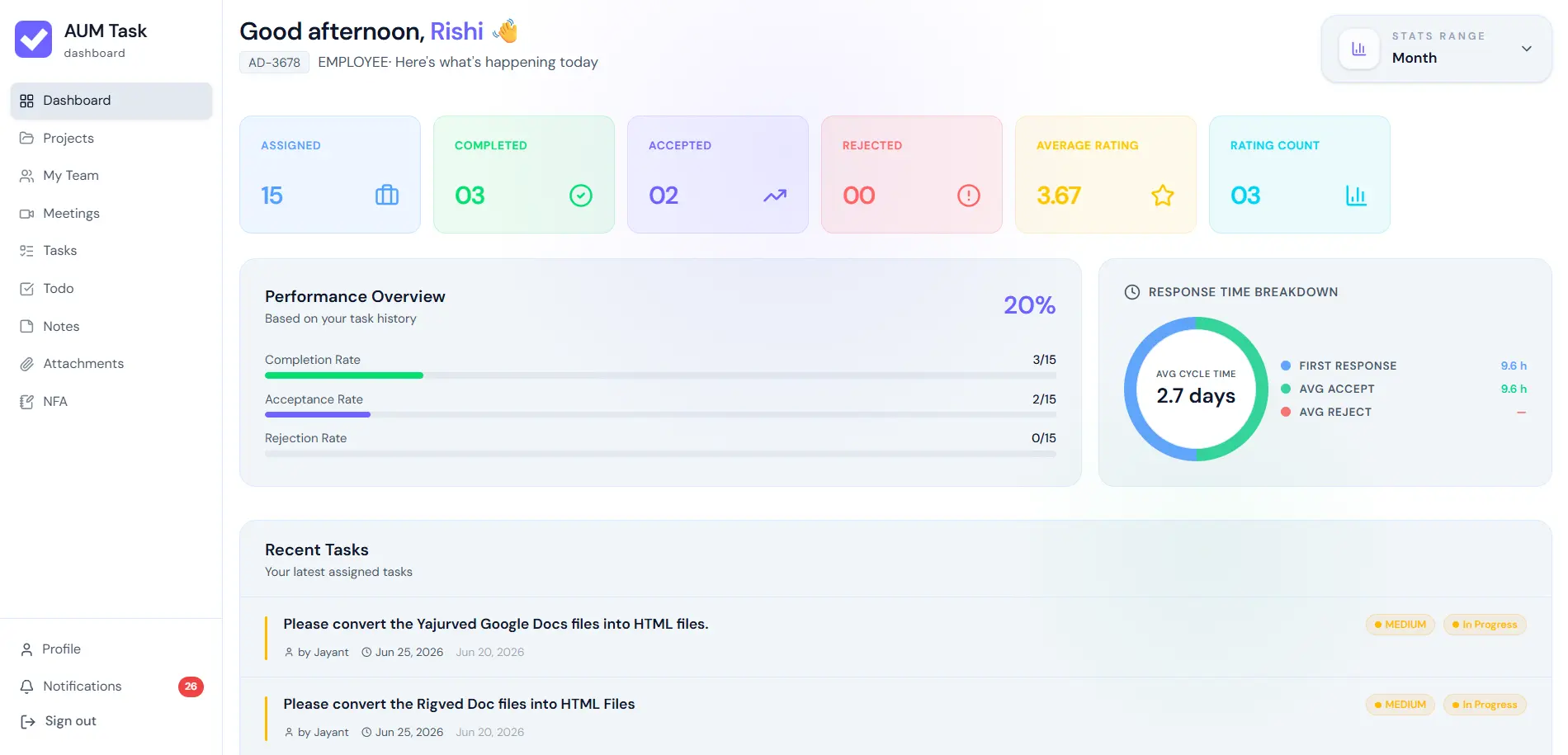
How does the Performance Analytics Dashboard work?
Our dashboard tracks your team's capacity and efficiency in real time. You get visual KPI cards for assigned, completed, and accepted work, alongside a cycle time breakdown (like First Response and Average Accept time) to help you spot bottlenecks instantly.
Can I easily find old project files?
Yes! The Attachments module automatically gathers files from all your tasks and to-dos into one centralized location. You can track original uploaders and download files without having to search through endless task threads.
What formatting options do Smart Notes support?
Smart Notes feature a powerful rich-text editor. You can instantly capture ideas, add headings, insert code blocks, build tables, and visually organize your workspace with customizable color-coded notes.
Is it difficult to migrate my team to AUM Task?
Not at all. AUM Task is designed for instant usability with a clean, unified project management system. You can invite your team members, set up your first project workspace, and start assigning tasks in just a few minutes.
What kind of customer support do you offer?
We offer dedicated support to ensure your team's workflows run smoothly. You can easily reach out to our team via the Contact section for any technical assistance, onboarding help, or custom requirements.
What is task management?
Task management is the process of creating, assigning, prioritizing, and tracking individual pieces of work so nothing falls through the cracks. AUM Task handles this with clear ownership, deadlines, and real time status updates across your whole team.
What is project management?
Project management is the practice of planning and overseeing a larger initiative, made up of many individual tasks, from start to finish. In simple terms, project management meaning covers timelines, ownership, and progress tracking, all of which AUM Task brings into one workspace.
Is AUM Task considered project management software?
Yes. AUM Task functions as full project management software, combining task assignment, project based organization, approvals, and team workload visibility, so you do not need separate software project management tools stitched together.
Does AUM Task use AI for project management?
Yes. AUM Task includes AI powered task descriptions that automatically improve clarity, one of several ways we are bringing ai project management and ai in project management capabilities directly into your daily workflow.
Is AUM Task also referred to as OM Task?
Yes! Many users search for or refer to AUM Task as OM Task due to phonetic pronunciation. Whether you know us as AUM Task or OM Task, you are in the right place! AUM Task is our official platform providing complete task management, workspace tracking, meetings, and Note for Approval (NFA) workflows.
How does AUM Task (OM Task) help teams organize daily work?
AUM Task (often searched as OM Task) organizes team productivity by bringing task assignment, project milestones, real-time video meetings, and official NFA document approvals under one unified login. With a free tier for up to 5 users, OM Task / AUM Task simplifies business operations without extra software costs.
FROM OUR BLOG
Insights, Tips & Productivity Guides.
Stay ahead with expert articles on team management, productivity workflows, and product updates.